When a customer places an order, various departments need the same information to complete their work. The sales team confirms the purchase, finance handles the billing, and the warehouse prepares the items for dispatch. When the applications used by these teams do not share information, employees may face incorrect records, missed updates, and delays in completing their tasks. Software development services help businesses connect their existing systems so that relevant information reaches the right teams when needed. Although CRM platforms, ERP solutions, and other business tools serve different purposes, they often rely on shared data. This blog explores how businesses can integrate these systems, the technologies involved, and the steps required for successful implementation.
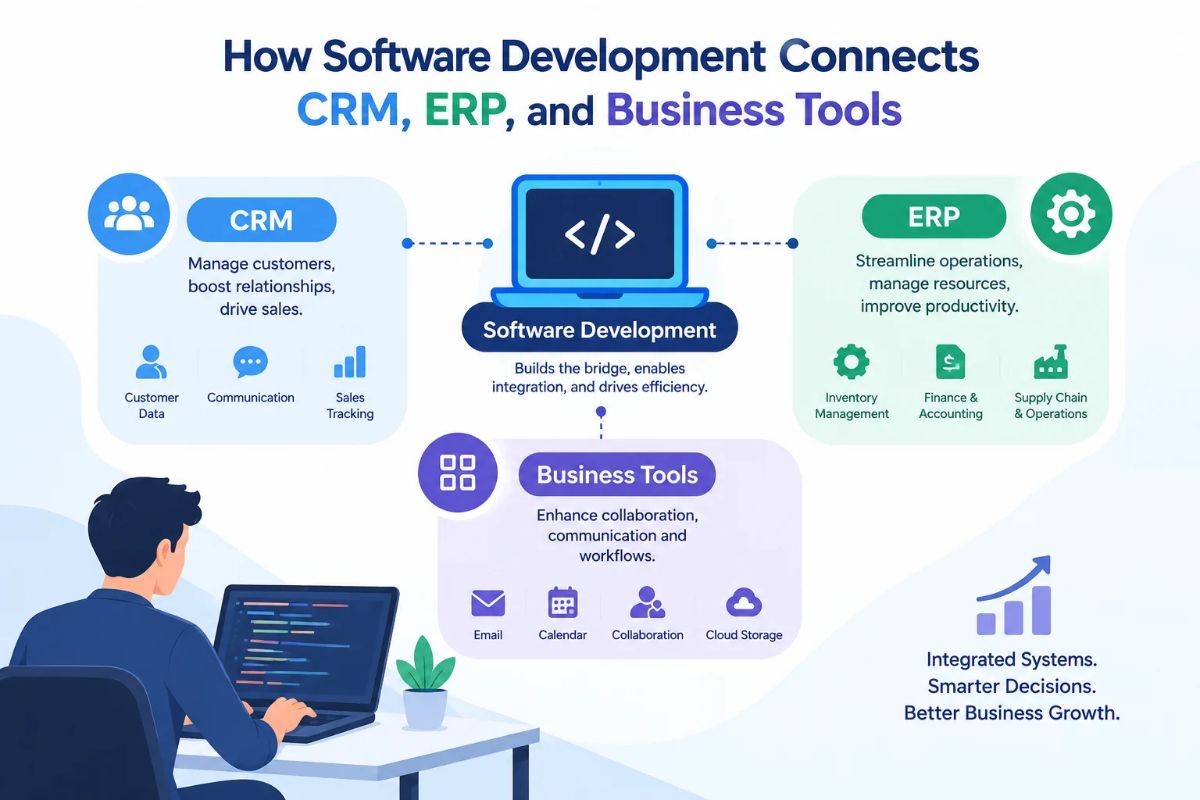
How Software Development Connects CRM and ERP Systems
Although in practice the CRM and ERP systems operate in various fields of business processes, their information often overlaps. Customer data, information about the products, quotes and orders, invoices, and payment status often need to pass from one system to another.
The software development company can be useful for organizations as they help create the logic, interfaces, and data exchange means that enable the systems to work together. The integration depends on the software used in the organization, its technical limitations, and the business processes that need to be automated.
1. Integrating Customer and Operational Data
Typically, customer profiles, sales negotiations, lead details, and preferences are retained by CRM software. An ERP software, on the other hand, also holds the billing information, payment history, shipping addresses, and transaction records of a customer. Integration ensures that the approved information can flow between such systems in accordance with certain legal regulations.
For instance, if the sales team updates the billing address of a certain customer entered in the CRM, the system can easily validate the changes made, and the corresponding ERP system file can be updated. Thus, there will no longer be a problem of repeating data entries, and the workers will have to deal with the same information only.
Also, the developers should decide which system gets all information about a specific data field and manages it.
2. Automating the Order-to-Cash Process
The order-to-cash cycle includes several connected activities, from accepting a customer’s order to collecting payment.
Without integration, sales representatives may need to send order details to finance manually. Inventory teams might not receive the information until someone forwards an email, delaying fulfillment.
A connected workflow can automate much of this process:
- The CRM records the confirmed deal and customer requirements.
- The integration layer transfers validated order information to the ERP.
- The ERP checks inventory, pricing rules, and relevant business conditions.
- Finance generates an invoice through the appropriate system.
- Order and payment statuses become available to authorized users in connected applications.
This workflow reduces unnecessary handoffs while giving teams a clearer view of each transaction. The exact sequence depends on the organization’s approval procedures, accounting rules, and fulfillment requirements.
3. Synchronizing Customer Service and Financial Information
Customer service personnel need information beyond CRM, for instance, shipment status or status of invoices, product availability, or payment verification.
Integration of software allows the support team to access necessary ERP data. Now they can check the status of the order without switching to another application.
Access control makes it possible to determine what information the agents can access and update. It is particularly important in cases where financial and personal information is present.
Connecting Business Tools Beyond CRM and ERP
Integrating CRM and ERP is just a fraction of creating a connected company. Organizations must also consider linking advertising solutions, bookkeeping applications, inventory systems, communication software, payment systems, and project management tools. The appropriate integration plan depends on the methods of using the above-mentioned software and what data is to be transferred from one to another. An effective integration should fulfil some functional purpose rather than add unnecessary complications on the technical side.
Marketing Automation and CRM
Connecting marketing platforms with a CRM helps sales and marketing teams maintain continuity throughout the customer journey.
When a prospect submits a form, the integration can create a lead in the CRM. Campaign engagement data can help sales representatives understand the prospect’s interests, subject to applicable consent and privacy requirements.
Once a lead becomes a customer, the system can update its status and support relevant follow-up workflows. This reduces the gap between marketing activity and sales execution.
Inventory, E-Commerce, and Payment Systems
A web-based shop relies on the correctness of product availability, price, order information, and payment status.
An ERP integration can help bring inventory numbers in line and send confirmed orders to be processed. Payment gateway warning should be fed into the records of all transactions, while shipping services can update the shipping status.
Think of a retailer that operates through different net channels. Without an adequate synchronization process, a customer will know the product is in stock at places where it is nearly sold out.
HR, Payroll, and Project Management Tools
Internal Business Applications also gain from integration. The employee data stored in the HR system could facilitate movement of approved payroll workflows, while project management applications can receive respective assignments and resource data from other applications.
Nonetheless, working with employee data would need a very careful approach in terms of permissions management. Only data relevant to the specific workflow will be transferred, while sensitive information remains accessible only to authorized users.
Key Technical Considerations for Reliable Integration
The process of linking applications does not only pertain to the data exchange between two software systems. It is essential for the integration to be accurate, secure, and sustainable for changes in business requirements.
The seasoned developers carefully consider matters of data compatibility, limitations of systems, user access control, and operational dependability before starting the connection process.
Data Mapping and Transformation
Many applications might handle the same data in a different way. For example, one application might assign an internal ID to an individual or business entity, while another application might be using an email address for the same purpose.
Data mapping is about connecting the fields of data that are sent from one or several systems. The definitions of transformation concern several things, such as formatting the data, which means making it uniform and checking if everything is recorded.
Moreover, developers may encounter problems, such as missing values in the fields, duplication of records, differences in date formats, and disparities in currency or status representations.
Security and Access Control
The creation of integrated systems can lead to the compromise of sensitive information due to the permissive nature of the access and security policies.
Secure implementations would make use of the relevant authentication/authorization, encrypted communication, and access controls to the application and APIs. API keys and credentials have to be stored securely instead of being compiled into application code. Audit logs can assist organizations in tracing changes and spotting suspect actions.
In cases when personal or financial information is used, integration processes should satisfy relevant requirements regarding privacy and storage policy.
Error Handling and Data Consistency
Interruption in the network, expiration of a password, restrictions of API, and temporary unavailability of the service may result in the information not getting delivered correctly.
Reliable integrations should have means to detect problems, to enter failures, to retry applicable processes, and to notify responsible parties in case they need to intervene. While retrying transactions, there should be accounting for duplicate transactions.
If, for example, we attempt to submit the same order after the ERP system has already processed it, we may create a new order. To prevent this situation, idempotent technology and other corresponding mechanisms are to be used.
Scalability and Performance
Integration needs may evolve as volumes of transactions increase or as many other applications join the technological stack.
A design suitable for a small number of daily orders may fail when thousands of transactions come in a short time. Programmers should consider the characteristics of APIs, processing capacity, database performance, and asynchronous processing or message queue requirements.
Monitoring response times, failed transactions, and the backlog of transactions helps teams identify malfunctioning processes before they start to impact operations.
How to Plan a Successful Business System Integration
A clear plan helps businesses connect their systems without disrupting daily operations. These steps make the process easier to manage:
Step 1: Identify Operational Gaps
- Find tasks that involve repeated data entry or switching between applications.
- Choose a priority workflow, such as order processing or inventory updates.
Step 2: Evaluate Existing Systems
- Check API availability, data formats, security features, and platform limitations.
- Determine whether direct integration, middleware, or custom connectors are needed.
Step 3: Define Integration Rules
- Decide which system manages each type of information and when updates should occur.
- Set data validation rules, user permissions, and procedures for handling errors.
Step 4: Develop and Test the Integration
- Test data exchange, duplicate requests, invalid records, and system outages.
- Ask relevant teams to confirm that the integration supports their actual workflows.
Step 5: Monitor and Improve
- Track failed transactions, data inconsistencies, and processing delays after deployment.
- Update the integration as business needs change, and maintain clear documentation for future troubleshooting.
Conclusion
Connecting CRM, ERP, and other business tools helps organizations maintain accurate data, automate routine tasks, and improve coordination across departments. APIs, middleware, and custom integrations allow applications to exchange information securely while supporting individual business functions. At Devherds, we provide tailored software development services, including custom software solutions, API integration, and backend engineering, to help businesses build connected digital ecosystems. We also provide a free 30-minute strategy call to discuss your integration challenges, evaluate suitable technologies, and identify opportunities to streamline operations. Connect with us to develop an integrated business infrastructure that supports efficiency and long-term growth.